
How it works
Snap, cook, track. Three steps to dinner.
No typing in groceries, no meal-plan spreadsheet. Point your camera at the fridge and Scrappy takes it from there.

Snap your fridge
Open the fridge and take one photo. Scrappy reads what is inside and tags each item by how soon it needs cooking, so nothing gets forgotten at the back of the shelf.

Cook with guided steps
Follow short, clear steps built around your ingredients, one at a time, so you always know what to do next without scrolling back through a wall of text.

Track what you saved
Mark the dish cooked when you are done. Scrappy keeps a running tally of meals cooked and ingredients rescued, so the value of cooking from your fridge is easy to see.
What is inside
Built to use what you already bought.
Your preferences
Tailored to how you actually cook
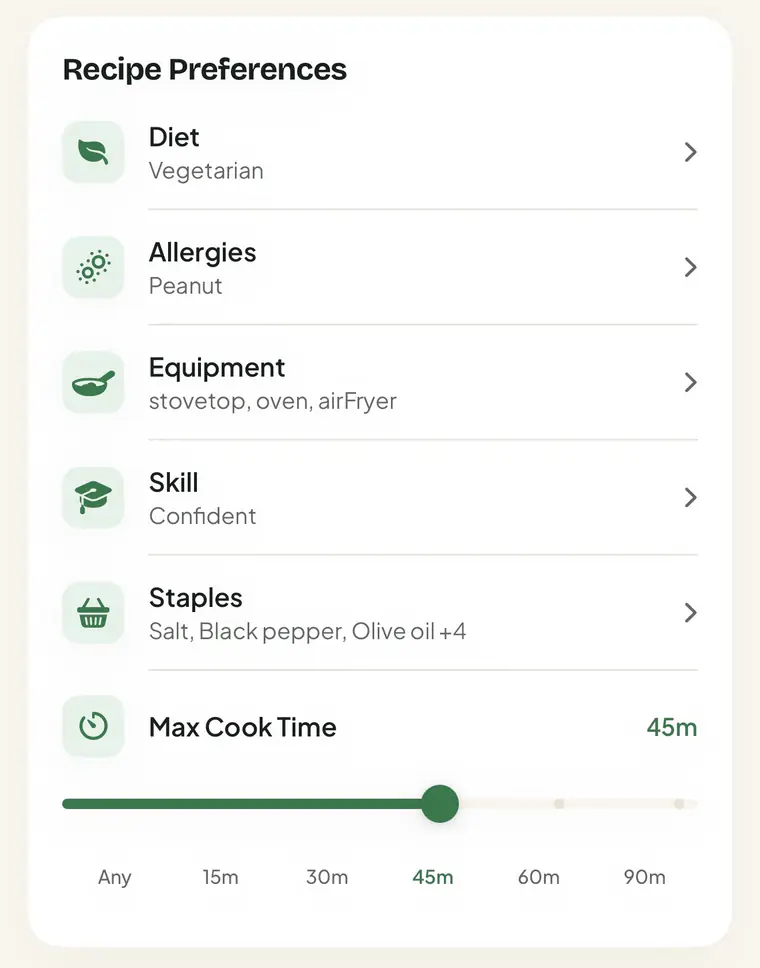
Set your diet, allergies, skill level, and the equipment you own once. From then on Scrappy only suggests recipes you can actually make.
- Diet and allergies, so the food you cannot eat never shows up.
- Skill level, so steps match how comfortable you are in the kitchen.
- Equipment you own, so a recipe never needs a pan you do not have.
Questions
Common questions
Do I have to type in my groceries?
No. You snap a photo of your open fridge and Scrappy reads what is inside, tagging each item by how soon it should be cooked.
Which devices does Scrappy work on?
Scrappy is built for iPhone and iOS first. It is on the App Store now.
Does it work with my diet and allergies?
Yes. You set your diet, allergies, skill level, and the equipment you own once, and recipes are matched to what you can actually make.
Does Scrappy keep my fridge photos?
Your fridge photo is prepared on your phone, sent to our server for the scan, and not stored there. Your phone keeps your 30 most recent scans. The full detail is in our Privacy Policy.
How does Scrappy pick recipes?
It ranks recipes by what is closest to spoiling in your fridge, then filters by your diet, allergies, skill, and gear, so the top pick is something you can cook tonight.
Where do I get Scrappy?
On the App Store. The badge on this page goes straight to the listing.
Cook what you already have.
Scrappy is out now on iOS. Snap your fridge, cook more, waste less.